Automatic SSL Certificates (ACME)
According to Wikipedia:
An SSL certificate (Secure Sockets Layer certificate) is a digital document that verifies a website's identity, enables an encrypted connection (HTTPS) between a web server and browser, and protects sensitive user data by ensuring that any exchanged information is scrambled and secure. It is a core component of web security, displayed as a padlock in the browser's address bar and is essential for e-commerce and any site handling personal information.
It has historically been required that users and administrators obtain SSL certificates to use SSL on their websites with any product including LiteSpeed, and they configure the server to use the certificates. Furthermore it has been the user's responsibility to make sure that these certificates are renewed as necessary, and any updates to aliases will require regeneration of the certificate.
Starting in OpenLiteSpeed version 1.9 you can have LiteSpeed generate certificates for you using the Automatic Certificate Management Environment (ACME) certifier protocol. This requires very little new from you, and your existing certificates will continue to be honored.
Info
We will refer to the feature using the ACME abbreviation throughout this documentation.
Using ACME with the mod_acme module, if you do not configure a certificate but do request that a secure environment be used, a proper certificate will be created. You are still required to configure as a VHost or template entry the name which points to your server, but once that is done, the certificate will be generated and renewed as needed.
Tip
If you have certbot for existing certificates or use purchased certificates none of the ACME features will interfere with those certificates. You can mix and match OpenLiteSpeed ACME with other certificate mechanisms. You may eventually choose to transition users to OpenLiteSpeed ACME as it is fully integrated into OpenLiteSpeed.
This feature is only for OpenLiteSpeed Linux servers which run as root. These servers must be internet connected to send and receive requests on the default HTTP port (80) and a secure port (typically 443, but it is not required that it use that particular port).
Installation
The LiteSpeed ACME function uses the acme.sh script and it must be installed using our installation script at the root of the LiteSpeed directory. There are no required parameters to it.
/usr/local/lsws/admin/misc/install_acme.sh
This will create the acme directory from the root of the LiteSpeed directory and all certs created will be stored in the conf/cert/acme/certs directory. These directories should be only modified by LiteSpeed internally. Note that this script will modify the configuration to use the mod_acme module and will gracefully restart LiteSpeed.
Advanced installation
As part of the installation you can also specify your email address and the certification authority.
For the certification authority it will use letsencrypt.org (https://acme-v02.api.letsencrypt.org/directory) as the default. You can also use the certification authorities listed here. Note that only the full URL is supported, not the Short Name. This is specified with the -s switch at install time.
When doing certifications, you can also specify your email address to be used for notifications which may be useful if the certification authority generates them. letsencrypt.org no longer generates renewal notifications and thus this is optional. However, if we detect a valid email address in the LiteSpeed configuration file, we will submit it to acme.sh as your address. The email address can also be specified with the -e switch at install time.
For example, to specify the email address of you@example.com and the letsencrypt_test environment:
/usr/local/lsws/admin/misc/install_acme.sh -e you@example.com -s https://acme-staging-v02.api.letsencrypt.org/directory
By default the installation script will use the directory where the script is run from. If you wish to specify an alternate directory, you can do it with the -l switch. For example, to install to /usr/local/lsws2:
/usr/local/lsws/admin/misc/install_acme.sh -l /usr/local/lsws2
Note
If you want to change any of the installation options, you must uninstall the feature and re-install it.
Uninstall
If you wish to stop using automatic certs, there is an uninstall script which will remove the configuration entry from the LiteSpeed configuration, delete the certs and delete the acme directory. To run it, as root:
/usr/local/lsws/admin/misc/uninstall_acme.sh
It also supports the -l switch to specify the LiteSpeed directory as for the install.
Configuration
Configuration consists of two types:
- Overall configuration. This is configuration performed within Server Configuration.
- For all listeners. This is configuration you do whenever you need to add, modify or delete a domain name from your system.
- (Optionally) ACME VHost or Template configuration. Only required if you enable ACME at the VHost level or need to generate wildcard certs.
Overall Configuration
To enable the ACME feature, in the WebAdmin Console, navigate to Server Configuration > Tuning. In the SSL Global Settings group press the Edit icon.
AutoCert with ACME: You have the option of:
Disabled: Certs for all VHosts will be manually specified. The ACME facility will not be available.Off: Certs for VHosts will be created and used when the ACME facility is enabled at the VHost or Template level. This is the default.Enabled: Certs for all VHosts will be created and used using ACME unless manually specified.
The installation program will create the mod_acme entry and it will appear in the Modules tab. We strongly recommend that it not be modified.
Listener Configuration
To use the facility you configure listeners as you would normally. ACME certificates are generated for listening ports which are marked Secure. If you wish you can still manually specify certificates and those will be used. This lets you use ACME and your existing configuration without affecting your existing definitions.
As for standard configuration, in the Domains field, domain aliases are configured comma separated after the primary domain.
It is your responsibility to make sure that all of the domain names you specify exist and point to the configured server and port.
You must also configure the HTTP listener on port 80 for all of your non-wildcard certificates as well as SSL. This is required for the verification of the cert as LiteSpeed needs to be able to find the VHost at certification time on the HTTP port 80 configuration.
If you use the wildcard domain * (by itself), and it's a secure listener, the VHost name is used as the domain name to generate the cert.
Template Listeners
In VHost Templates, you specify in Member Virtual Hosts and press the + icon to add a mapping:
- Domain Name: A single domain name which becomes the primary name for ACME
- Domain Aliases: A comma separated list of alternate names which are the ACME aliases.
VHost or Template Configuration
If you specified in the Overall Configuration the ACME option of Off, you must configure in Virtual Hosts > your VHost > SSL > AutoCert with ACME group. Select the Edit icon.
For Enabled: Select:
Not Set: Select this option to use the value specified in the overall configuration.Enabled: Select this option to enable the ACME cert for this VHost unless manually specified.Off: Select this option to disable the ACME cert for this VHost.
The other parameters are used below for wildcard certificates.
Restart
Once you have completed configuration, a graceful restart will cause LiteSpeed to generate the certs; once it has created the certs, it will internally restart to then use the certs generated. If there are issues, the certs will not be generated, and there will be NOTICE messages written to the error.log file.
Wildcard Certificates
Wildcard certificates are certificates which have a high level, single asterisk, like *.example.com. These certificates require the use of the DNS-01 authentication type, which requires authentication by a DNS authority. This can't be done by LiteSpeed, it must be done by a DNS server with an API. The acme.sh facility has a large number of certifiers they support as described here. What LiteSpeed will do is take the information you provide it and generate the certificates using the DNS APIs.
There are several aspects to the configuration:
- Initial setup. This includes pointing your domain to a supported DNS server domain, defining the wildcard definition, and obtaining the API required information.
- Configuring OpenLiteSpeed VHost
- Configuring OpenLiteSpeed Listener
- Restart and Addressing issues.
Initial Wildcard Configuration
An example of a domain purchased on Namecheap, pointed to CloudFlare and then pointed to a LiteSpeed server will be used as illustration. While you can purchase your domain from any source, since LiteSpeed must communicate with the DNS server you must use it for all of your wildcard certificates. Thus in this example, all wildcard certificates will use the CloudFlare DNS server environment.
The beginning steps are:
- Setup a server for LiteSpeed with a static IP address, and install and perform basic configuration of OpenLiteSpeed. You should do the steps above to install the LiteSpeed ACME facility and configure a domain successfully.
- Using Namecheap (for example), purchase your domain name. No need for initial configuration of the domain
- In this example we are using CloudFlare. You can use a free account. Use the Onboard a domain to register the domain to your account. It will give you two nameservers, in this case
chan.ns.cloudflare.comandruben.ns.cloudflare.com - From the Namecheap Domain List press the Manage button for your domain. In the Nameservers group select the type of Custom DNS and enter the nameservers you were given by CloudFlare:
chan.ns.cloudflare.comandruben.ns.cloudflare.com. - In CloudFlare, in your domain, select DNS > Records. Press the Add record button:
- Type:
A - Name:
* - IPv4 address: The static IP address of your server.
- Type:
- In CloudFlare you will need an API Token (only done once). If you do not already have one:
- Select the Human icon at the top right of the screen and select Profile
- On the left side menu select API Tokens
- In the API Tokens group, press the Create Token button.
- Next to Edit zone DNS press the Use Template button.
- Permissions: You will need the default of
Zone,DNS, andEditpermission. - Zone Resources: Select
IncludeandAll zones - Press the Continue to summary button and then the Create Token button. This will provide you an
API Token. You will need to preserve it and use it below.
- Permissions: You will need the default of
Additional LiteSpeed VHost Configuration
You will need to configure LiteSpeed as mentioned above, with some additional notes:
In the Virtual Host or VHost Template configuration, press the SSL tab and in the group named AutoCert with ACME press the Edit icon.
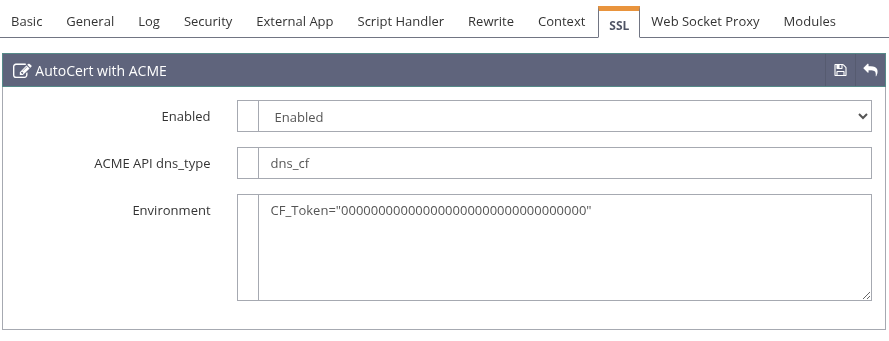
- Enabled: Select
Enableto enable the feature. - ACME API dns_type: Specify the API dns_ type described here. For CloudFlare that would be
dns_cf. - Environment: Specify each environment variable on a separate line as
TITLE="VALUE"entries. For CloudFlare there is only one required value:CF_Token="YOUR_TOKEN"
Use with QUIC.cloud
To use the ACME facility with QUIC.cloud is almost exactly the same as for use with CloudFlare. You can have mix and match DNS server types in separate VHosts. Thus you can have CloudFlare VHosts and QUIC.cloud VHosts on the same server.
You need to obtain an API key from the QUIC.cloud system. If you do not already have one, once logged onto QUIC.cloud:
- Select the Human icon at the top right of the screen and select Edit Profile
- On the left side of the screen, press the API Access item.
- Press the Generate Key button. It will present you with a token you will need below.
In the LiteSpeed VHost configuration, you will need to specify in the SSL tab, AutoCert with ACME configuration:
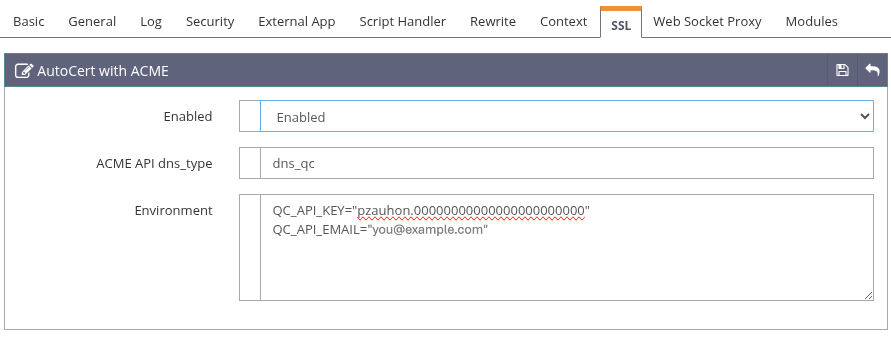
- ACME API dns_type: For QUIC.cloud this is dns_qc
- Environment: You will need to specify two environment variables:
- QC_API_KEY: This is the API Token value obtained in the QUIC.cloud screens.
- QC_API_EMAIL: This is the email you used in your QUIC.cloud configuration
Modifying the vhost.conf file
If you need to modify the vhost.conf file rather than use the panels, you will need to add a new group within the vhssl group named acme:
- enabled:
0: Not Set,1: Off,2: On - api: Specify the API dns type.
- env: Specify 0 or more
TITLE="VALUE"values.
For the CloudFlare example, you would add to the vhost.conf file:
acme {
  enabled 2
  api     dns_cf
  env     CF_Token="00000000000000000000000000000000"
}
For a template, it is within the template.conf file, indented inside the VirtualHostConfig, vhssl blocks.
Listener Configuration
As above, you use the LiteSpeed configuration facility to create a VHost and a then a Listener to point to it. Differences are for the Listener configuration:
- You do not need to create a port 80 listener for your domain.
- For the SSL listener in the Virtual Host Mappings for Domains you must specify
example.com, *.example.com. This is the non-wildcarded domain followed by the wildcarded domain. The wildcard is always followed by a dot and the domain name. You must specify the domain without the wildcard first, a comma, then a single wildcard, a dot and the domain you purchased. Thus for a domain namedcompany.comyou'd specifycompany.com, *.company.com.
For a template you specify the Domain Name without the wildcard, like example.com and the Domain Aliases with the wildcard, like *.example.com.
Restart
Once you have it all configured, a graceful restart will read the definition, and it will attempt to create the certificate files. See the LiteSpeed error log for important messages if the certificates are not created in the /usr/local/lsws/conf/cert/acme/certs directory with the non-wildcarded domain name as the directory name, with the certificate files inside it.
How it works
LiteSpeed uses acme.sh to create, renew, revoke and remove certificates. acme.sh and its binary files are stored in the $LSWS_HOME/acme directory. All certificates are managed as the lsadm user just as all configuration entries are.
Certificate files are stored in the $LSWS_HOME/conf/cert/acme/certs directory with the highest level directory being the domain name with a _ecc suffix. Thus for the example.com domain, its certs are typically stored in the /usr/local/lsws/conf/cert/acme/certs/example.com_ecc directory. You generally do not need to be aware of the location of these files.
Renewals are performed automatically by LiteSpeed as needed when the certificate is within 30 days of expiration. LiteSpeed will do a daily check of all of the domains and if it finds one needing renewal it will do so. This includes wildcard domains. If the DNS system maintains its own renewal schedule, as CloudFlare does, LiteSpeed will still perform the renewal so as to obtain the latest information.
Problem Determination
Errors are written to the LiteSpeed error log, typically in /usr/local/lsws/logs/error.log. Note that a badly specified listener mapping configuration may result in certs not being generated and errors written to the log.
Additional Administration
Advanced administration of the certs is available using the $LSWS_HOME/acme/acme.sh program running as the lsadm user. As required by acme.sh you must also source acme.sh.env. By default the execute bit is not on for that file. To enable it, you will need to do, one time from the /usr/local/lsws/acme directory:
chmod 755 acme.sh.env
To get a list of certs created and maintained by LiteSpeed, run (as root):
sudo -u lsadm bash -c ". ./acme.sh.env;./acme.sh --list"
For which you might see a list like this:
Main_Domain     KeyLength  SAN_Domains                    CA               Created               Renew
autols.website  "ec-256"   autols.shop,autosslls.website  LetsEncrypt.org  2025-09-22T19:40:16Z  2025-11-20T19:40:16Z
Since certs are created in stateless mode, it is not recommended that you modify your certs using this program, but you may be directed to use it by LiteSpeed support.